Scaling Local Compute
Effectively utilizing a second machine.
Recently I have been running more and more jobs requiring my GPU across a range of applications. Although all of these projects have been developed to only require a single GPU, each generally requires the full available VRAM. This has become especially problematic as I have ventured into longer running jobs, from agentic ARC solvers crunching for a full day to SLM pre-training runs that require at least a week. These long-running jobs block any parallel model development for other projects as well as recreational computer use (Hanabi). Therefore, I dipped my toe into homelabbing and built a dedicated cluster for running GPU-heavy jobs in the background without impacting my main machine.
Building the Second Computer
Given the desired goal of supporting parallel jobs isolated from my main computer, it was clear that I needed an entirely separate machine rather than just adding an additional card in my desktop.
Past Experiences
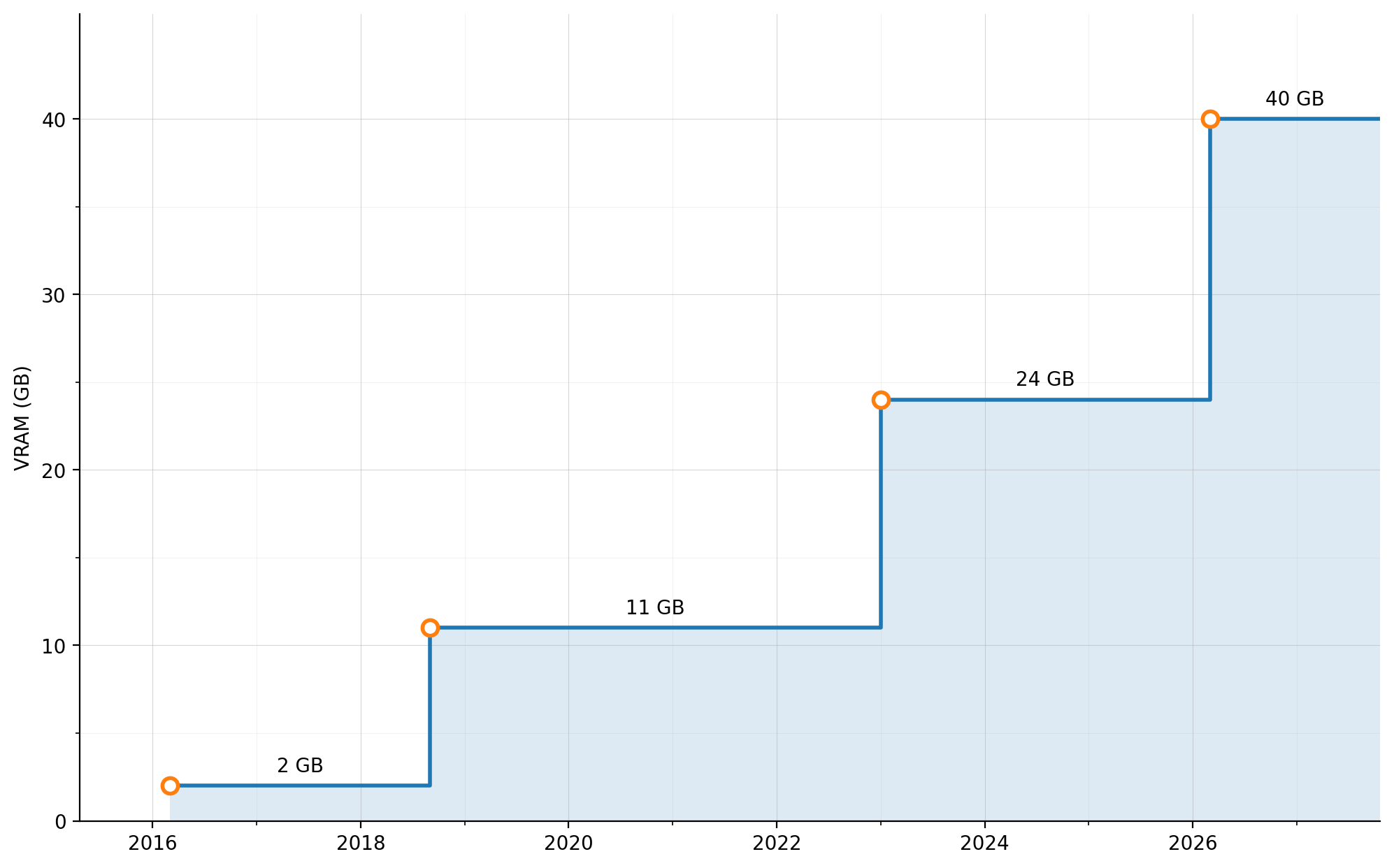
As a brief aside, I am typically a fairly frugal person, so it may seem strange that I would buy a second computer when my first was meeting all of my needs. However, I have historically found that investing in expanding my local compute has paid dividends for my career. When I started graduate school, I used a non-trivial fraction of my stipend building a then-powerful machine with an i7-5820k (no spoilers, but this becomes relevant again) and an RTX 960. Having access to a machine with 6 cores proved very useful for my graduate work, whether this was due to maxing out my allocation on various university clusters or needing to fast-track some results overnight. The 960 was the card that I used to learn CUDA and served me well during a capstone project for a parallel computation course that required writing and optimizing GPU kernels.
Towards the end of graduate school, as I became deeply involved with deep learning, I eventually decided to buy a 1080 Ti when the price crashed as the RTX 2000 series was announced. This was another large purchase given my stipend, but I believed that the payoff for my career prospects would be significant if I dedicated the time to use this card well. This also turned out to be a good decision, since the 11 GB of VRAM greatly expanded the size of the models that I could train. Many of the projects that I worked on outside of graduate school using this card ended up helping me secure my first job offers out of graduate school despite my physics background.
Finally, more recently I upgraded to an RTX 3090 when my friend was looking to sell his own card after upgrading to a coveted 4090. While this card did not produce job offers, it allowed me to explore lots of new models that would not have been possible without 24 GB. This includes everything from trying out local LLMs and image generation models, training SLMs from scratch, or hosting the computer vision models required for developing Perfect Form. Certainly, I will be able to continue to compound off the skills built from these projects throughout my career. So this was the third data point supporting my belief that investing in hardware is a form of investing in my career growth as long as I make the time to utilize the hardware.
Machine Design
Having convinced myself that building another computer was a defensible decision, I had to determine what I was going to build. While graphics cards have long been expensive, suddenly all of the other critical components have exploded in cost as well. With a fairly tight budget, I would be pretty limited if I was going to spec out a full build and still purchase a GPU with enough VRAM to be useful. This led me to a solution that would have been hard to imagine just a few years ago: I would resurrect my old computer that I retired during an unavoidable Black Friday sale back in 2022. The specs on this old system will not impress anyone (my trusty 5820k is a full 12 years old now), but the final system would be better suited for my needs by leveraging a free CPU, motherboard, and RAM to maximize my eventual GPU. I also stole an NVME drive from my desktop after moving around some files, so I would only need to obtain a power supply and case, since these had both survived the last upgrade.
In terms of the graphics card, there were a few different avenues that I explored. The big question was around balancing the VRAM vs. architecture age. My desktop had an RTX 3090 that was adequate in terms of both VRAM and speed. If I wanted both machines to have 24 GB of VRAM, it seemed to make sense to either pick up another used 3090 or search for a used 4090, in which case my existing 3090 would move to the new second machine. In searching Facebook marketplace (I guess we don’t use Craigslist anymore?), I learned that 3090s still command a pretty high price premium. At least when I was searching, they could not be found for less than $1,000, which seemed like a lot of money to spend on a 6 year old card with no warranty. The 4090 situation was even worse, with these cards being substantially more difficult to find and selling for twice as much.
The expense of obtaining 24 GB of VRAM forced me to consider an alternative route. I would move my 3090 into the second machine, and instead aim for a smaller card in my desktop. In this configuration, my desktop would serve more as a machine for prototyping solutions while the second machine would serve more as a cluster for running jobs. Calling a single machine with a single GPU a “cluster” is a bit grandiose, so I will just refer to this as my “compute node”. I did not want to go lower than 16 GB, and I obviously needed access to CUDA, so there were not too many options left after enforcing these constraints. I could try to target an older card like a 4060 Ti, but the price did not seem low enough compared to modern offerings to give this much serious thought. So I landed on either a 5060 Ti or a 5070 Ti. As someone who will likely continue to skip future hardware generations, I felt like the 5070 Ti would future-proof my setup a bit better, so I opted for the improved performance of the 5070 Ti.
After a quick trip to Microcenter to get a cheap case and a big power supply, as well as public meetup at a police station to purchase my graphics card, I had all of the parts needed to complete my Frankenstein project. Getting the machine online was much easier than expected, and the old parts booted without any hassle. Upgrading my desktop was actually more challenging, since I had to leapfrog versions of Ubuntu and CUDA until everything was sufficiently up-to-date that all of the software would play nicely with my new Blackwell chip. I also had an excuse to finally improve our home networking, even getting to crimp and splice ethernet cables so I could access both machines. I decided that the compute node would run headlessly, and I would rely heavily on SSH to use the same keyboard and monitors for both machines.
Parallel Development
One of the first challenges that I faced with my new setup was remembering where I was working, which is sort of an embarrassing problem to admit. After a few times of confusing myself with stack traces only to realize that I was looking at the incorrect copy of the code, I accidentally spent a good chunk of my PTO day dedicated to making actual progress on ongoing projects optimizing my setup. The goal was simple: provide an obvious visual indicator that would tell me what machine I was using at a glance. This meant having a machine-specific color code across the main applications that I used:
- Terminal
- Vim
- VSCode
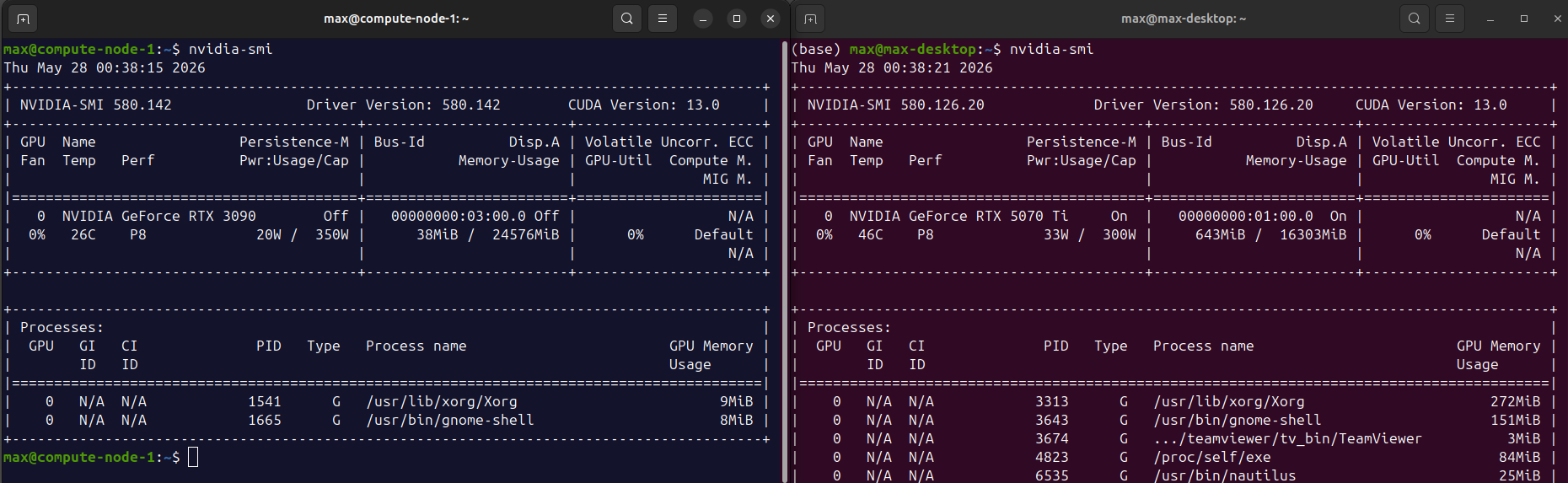
The terminal is pretty straightforward. Most of my time is spent directly in the terminal, whether running Claude Code, interacting with files, or running scripts. I landed on using the default Ubuntu purple background terminal for my desktop and a blue background for my server. The logic to set this was simple enough to define in my .bashrc based on the hostname. There were a few wrinkles ensuring that the color was reapplied inside of tmux (so excited this is cool again), since I rely heavily on this for managing both panes and sessions, as well as triggering the color logic upon exiting an SSH session.
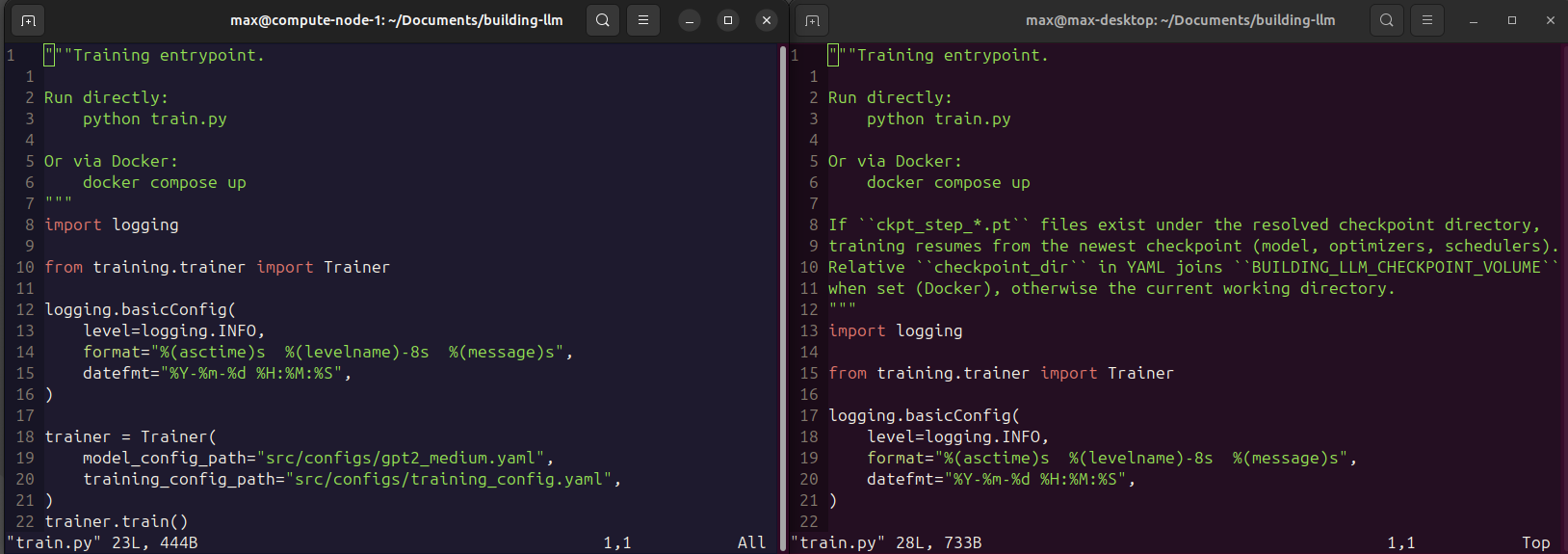
Configuring vim was more interesting and honestly probably not something that I would have tackled without Claude. As a long-time vim user, I have very strong opinions on the optimal color scheme (the correct answer is wombat256). However, using the optimal color scheme on both computers meant that I lost my visual machine indicator as soon as I opened vim. I wanted to use my darling wombat256 as untainted as possible while introducing subtle modifications to encode information about my current machine. I created a shared base profile based on the original wombat256 color scheme but introducing variables for the handful of colors that would differ across machine. Then, my desktop would define values for these variables that matched the purple theme and source the base profile, while the compute node would define values with subtle differences for these variables to match the blue profile while preserving everything else from the base profile. The end result was two sister color schemes that closely resembled the perfection of the original wombat256 while still providing the visual differentiation signal.
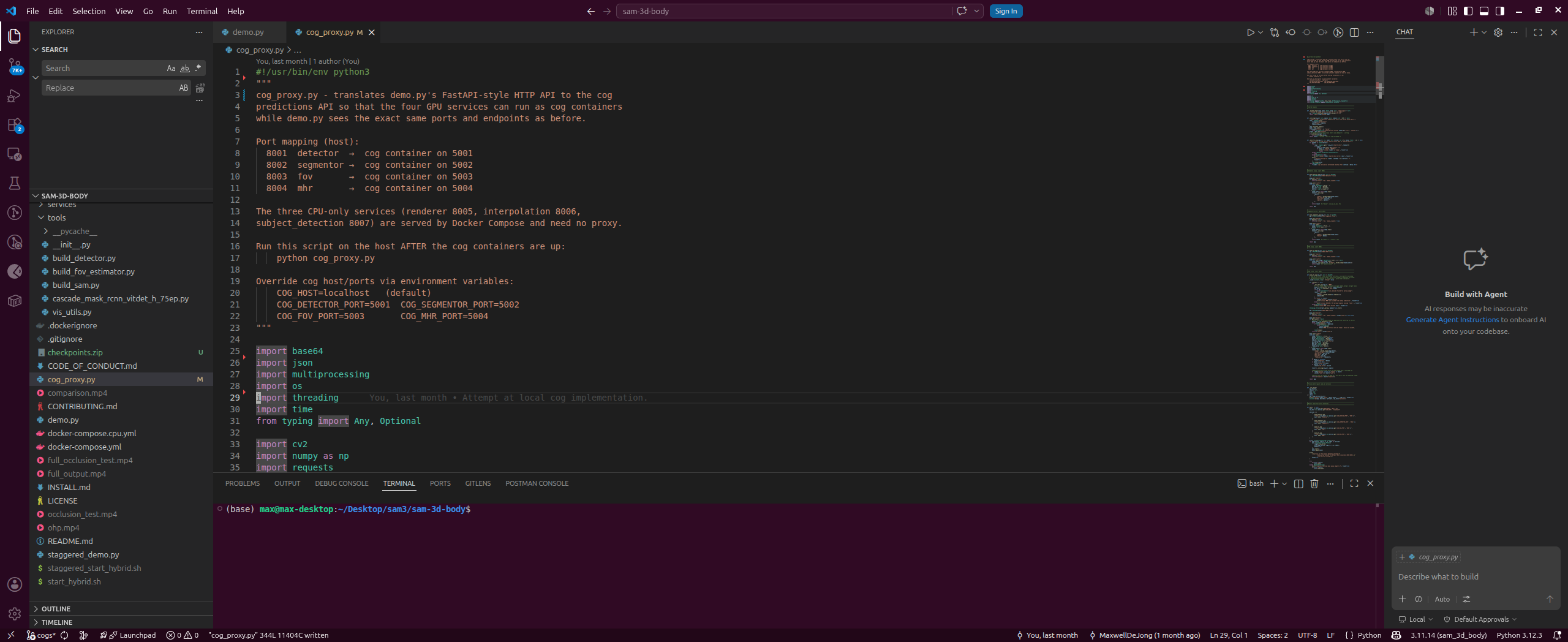
Finally, I also wanted to configure VSCode. I do not use VSCode a lot, since most of my AI-powered programming happens in Claude Code and my tradcoding happens in vim, but there are still situations where I feel like it is the best tool for the job. I especially find it helpful for inspecting diffs when I’m trying to understand and critique Claude’s changes. VSCode actually makes defining color customizations very easy with simple JSON (although programatically selecting the appropriate file conditional on the machine is significantly more complicated). Given my low utilization of VSCode, here I focused much more on function over form. My admittedly ugly IDEs will, however, prevent any confusion at the expense of visually pleasing design.
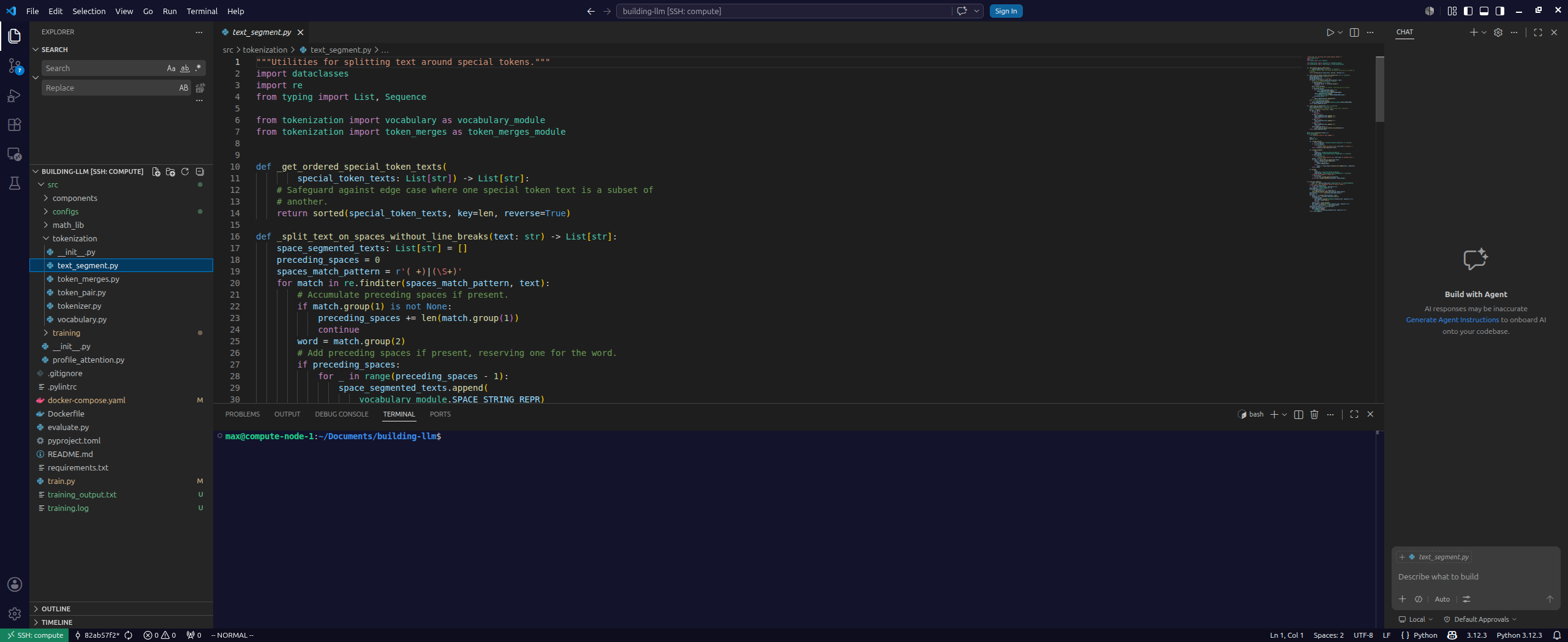
With all of these customizations, I had a productive setup for developing, debugging, and running code on both machines. If you are curious to learn more about my configuration, I created a public dotfiles repo that will hopefully reduce my initialization time in the future and maybe help you if you are exploring a similar setup.
Self-Hosting Perfect Form
This headline should confuse the astute reader, who may remember the chronicles of my journey from creating a locally hosted version of Perfect Form to a cloud-native solution running on AWS and Replicate. After investing so much time into creating an event-driven architecture capable of scaling to thousands of users, why would I ever consider self-hosting? I would lose my uptime guarantees and create a massive bottleneck by relying on the single physical machine in my basement.
Serverless GPUs are a Lie
Calling serverless GPUs a “lie” is a bit strong, but in my limited experience they fail to live up to their promises. The perfect cloud GPU infrastructure for this type of project has the following qualities:
- The GPUs scale down to zero when not in use. This is critical to my application, which has few users and a zero revenue.
- The GPUs scale up to handle the demand. This could be important for an imagined future where I experience heavy traffic but so far has been irrelevant.
- The GPUs are responsive to user requests. This would be critical if I were to have users without unlimited patience.
In my experience building on Replicate for the past few years, I would argue that the platform does a good job (with some caveats) with #1 and #2 and a poor job of #3. The first desired quality is clearly met, since I only pay for compute when in use. The second quality is also satisfied, although care is required to handle the cold boots. The cold boots are a major issue and seriously hurt the third desired quality.
Cold Boots
To explain my pain points, let me walk through a typical usage pattern. We have a video (or a collection of frames extracted from a video), and we want to run inference on all of the frames across several models sequentially with the smallest possible latency, since the user is sitting idly waiting for his or her video to be analyzed. In general, let’s assume that there is some temporal regularization, whether implicit or explicit, so that inference on the current frame may require access to the predictions from the previous frame(s). The obvious solution here is to decompose the video to be analyzed into individual frames, and then evaluate the sequence of models on each frame until all of the frames have been analyzed. An alternative would be to analyze the entire video within each sequential model, which increases latency but reduces the total data transmitted.
This straightforward picture becomes more complicated when we consider the cold start of each of the model containers. In practice, the time spent in the cold boot is often more than the time spent on actually running inference. The cold start time is also highly variable for runs across each model, and there is considerable variance across the different models. Finally, the problem becomes even more cumbersome due to the lack of configurability of when the warm container scales back down to zero. The result is that in practice, the user is often waiting 2 or 3 minutes for containers to boot before inference can even begin.
I have tried a few hacky solutions to try to reduce the latency around these cold boot times. For example, we can ping the endpoint with a dummy request as soon as a video is uploaded to overlap some of the cold boot time with the time required for necessary preprocessing computation. The problem is that if another request is sent before the first container boots, the request will trigger a second container to boot rather than queue up for the container already booting, which requires careful orchestration to avoid overlapping requests, especially in the current event-driven architecture. Similarly, we can send dummy requests at some frequency to keep containers warm to prevent them from turning off until all of the necessary containers are online, but this quickly becomes a non-trivial coordination task. The end result is a system of unneccessary complexity that still suffers from significant latency even after these tricks.
To add some hard numbers to back up my claims, I recorded the time to first frame on Replicate. These results are after significant efforts to reduce the load time in the cog files and are roughly a factor of 2 faster than the original latency numbers. We see that while this frame required around 2 seconds of inference time, the slowest cold boot time was almost 3 minutes. Additionally, we observe that the second and third containers are online 70 and 50 seconds, respectively, before the first container is ready, which introduces the possibility of them going cold before inference can begin. Finally, it is worth noting that the “Approximate cost” column is very misleading, since it only factors in the inference time, while in reality I am also paying for the boot time for each of these endpoints. So the inference time may only cost me \$0.002, but the total billable time is \$0.39 without factoring in time after which inference has completed but the endpoint remains online in case another request lands before the window terminates.

The Case for Self-Hosting
With a proper understanding of the pain points I experience for these low traffic, intermittent loads, let’s return to the original goals of an ideal system. While we remain in this regime where requests are uncommon, point #1 certainly appears important (cloud GPUs are expensive), point #2 offers little value, and point #3 is extremely important yet greatly misses the mark. Now, let’s contrast this a system relying on offloading all of the GPU microservices to our new compute node. We no longer scale to zero, but we aren’t paying for idle time (minus electricity), so this satisfies point #1. We cannot expand past a single machine, so we fail point #2. Finally, by having an always-on machine, we excel at point #3. Here’s the overall comparison:
| Point | Importance for Current Regime | Replicate | Self-Host |
|---|---|---|---|
| #1 | High | ✔ | ✔ |
| #2 | Low | ✔ | ✗ |
| #3 | High | ✗ | ✔ |
As we can see, self-hosting excels in the most important points outlined for our current regime. Now, one omission you may note is the lack of discussion around uptime. If the containers are running on Replicate, we should expect two or three 9s of availability. If we are instead self-hosting, we probably only have one or two. However, I don’t think a simple measure of uptime is actually the most appropriate metric for this application. Instead, we should think more in terms of an SLA. The quantity that directly impacts users is instead the waiting time to receive analysis upon submitting a video. If we are aiming for two minutes of latency, for example, no amount of uptime will achieve this on Replicate even for a single frame. However, the self-hosted route would allow us to to hit this mark consistently, even if the machine is only available 95% of the time. So we are trading a small decrease in availability for an infinite increase in meeting our latency target.
The Case Against Self-Hosting
As far as Perfect Form is concerned, then, it seems like there is only upside in switching to a self-hosted approach. Of course, there will be some amount of work to refactor the backend to support this, but it should not be a large lift given the current architecture. Rather, the bigger loser in this scenario would be me. In the naive implementation of the backend services containg the computer vision models required to run inference for Perfect Form, the entire GPU is required. Similarly, running the containerized SLM training jobs or any other models for different projects generally required the entire graphics card as well. So if my original goal was to add a second GPU to increase my project throughput, but then Perfect Form takes an entire GPU offline (and necessarily the RTX 3090 given the memory requirements of the latest models), I am actually worse off than where I started, since my usable VRAM for other projects just dropped from 24 GB to 16 GB.
I believe this problem actually has a technical solution. Given that we expect the requests from Perfect Form to be quite sparse, we would actually waste our extra card most of the time as it sits idle waiting for the next request. I have sketched out a design that would allow the machine to quickly respond to incoming requests but otherwise spend idle cycles working through long-running training runs. The core idea is introducing a system-level arbiter that is responsible for a GPU lock that is shared across both sets of containers. This article is already getting a bit long, and this design is unproven yet, so I will leave this as simply an idea for now. But I believe there is a relatively simple solution that would minimize the additional inference latency compared to a standard always-on microservice while effectively recovering the idle time between requests for training runs or other endeavors.